Mobile Candy Hole: portrait play on Android and iPhone
A phone gets the whole product rather than a cut-down one. The same field, the same object values, the same two instructions and the same collect control — restacked for a tall screen, and steered with a thumb that covers part of what it is steering towards.
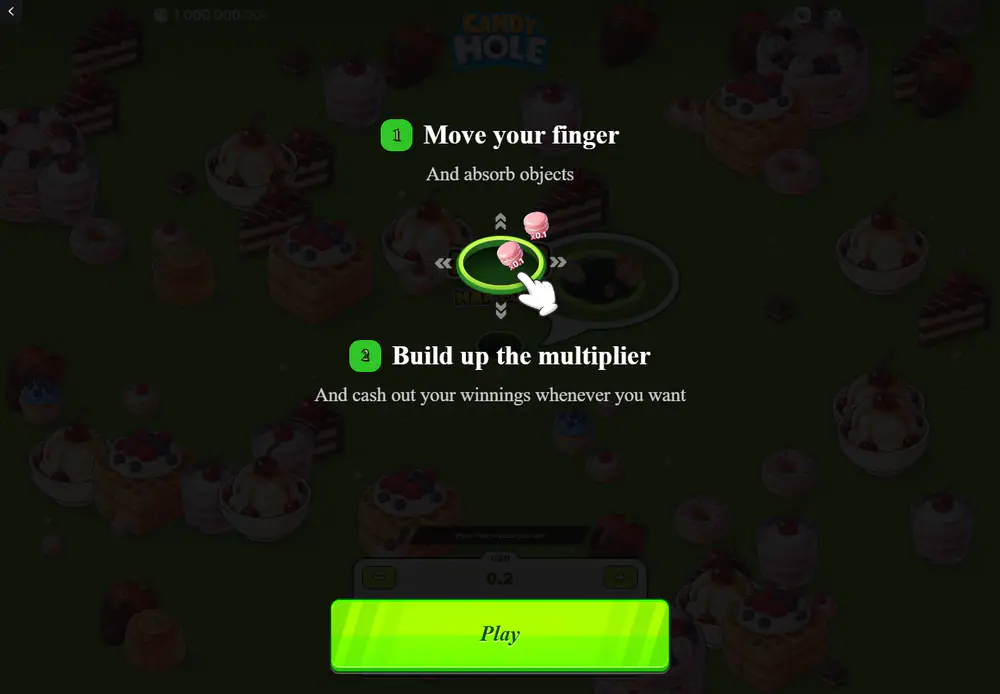
A whole phone viewport: both instructions, the amount panel and the action.
Can an instant game of this kind be played on a phone?
Yes, and in a browser: the title is built in HTML5 and opens in a mobile browser without an app, which is why nothing in these pages points at a store listing. Portrait is the defining format, and the frame kept here is one — both numbered instructions, the example burst, the amount panel and a full-width action button, all inside a single phone viewport with no scrolling.
What the portrait layout keeps
The top strip survives with the balance, the logo and the utility icons. The amount panel survives with its label, its increment buttons and its four shortcuts, restacked rather than reduced. The action button grows to the full width of the phone, which on a touch screen is the right decision and on this game a slightly ominous one, because that button commits the amount above it.
The example burst in the portrait overlay reads x50.00. It is an illustration of the second instruction rather than a figure from a round, and it appears in the phone overlay only.
What a smaller field does to a manual round
The field is not rescaled so much as cropped: a phone shows a tall slice of it, with objects above and below the hole and far less to the sides. On a game where the whole decision is "is the next thing worth going for", seeing less of the field is not a cosmetic difference — it is less information at the moment of the decision.
Steering costs more too. The thumb that moves the hole sits on top of the area immediately around it, which is exactly where the next object and its label are. None of this changes the arithmetic of the game; all of it changes how a round is played.
The same two instructions, laid out for a wide screen instead of a tall one.
What loads before the first round
The same blue loading view appears on a phone as on a desktop, with the same bar and percentage, and it exists because an animated field of hand-drawn objects is a larger thing to deliver than a page of text. Once the assets are there the round runs on local rendering and asks little more of the connection.
Reopening the game can bring the loading view back when a fresh asset session is needed, which on a phone switching between networks is a normal thing to see rather than a fault.
It is worth noticing what the bar implies about the game underneath. This is a drawn, animated field rendered continuously rather than a page of pictures, which is why the loading state exists at all and why an older or busier phone will show the difference in how smoothly the hole follows a thumb. Nothing about the outcome of a round depends on that; everything about how comfortably it is steered does.
The specification does not change with the screen
The published return, the object ladder, the ceiling and the cash cap are properties of the game and not of the device. There is no mobile edition with its own figures, no separate artwork set and nothing a phone unlocks or withholds.
The one thing a phone genuinely changes is the pace at which a person gets through rounds, and that is worth more attention than any layout detail on this page.
A round here is short, started by a thumb and ended by a thumb, with no autoplay to set and no automatic stop to rely on. On a desktop that still means sitting at a desk; on a phone it means a queue, a sofa, a few minutes before something else, repeated whenever the few minutes turn up. The arithmetic of the game is indifferent to where it is played, and the number of rounds an evening contains is not.
This is the point at which the stake chosen in the panel stops being a detail. An amount picked because it looked trivial once is the amount that goes out again on every round that follows it, and the panel does not add them up for you. Nothing on the screen will ever say what the session has cost so far; the only running total the interface keeps is the balance at the top, which moves too slowly to read as a warning.
Questions about playing on a phone
Is there an app?
No. The title runs in a mobile browser, which is also why it needs no installation and no store account.
Stated by the review covering this title, which names HTML5 and the browser explicitly.
Does a phone change the published return?
No. The figure belongs to the game and is the same on every screen it opens on.
Which screen orientation suits Candy Hole best on a phone?
Portrait is the format the game is laid out for. A wider orientation simply shows more of the same field.
Why does the loading view come back?
Because a fresh session has to fetch the artwork again. It is the normal opening state, not an error.
Does a smaller screen make a round harder?
It gives you less of the field to decide with and a thumb across the part you are steering into. The arithmetic is unchanged; the decision is taken with less in view.
The growth of the hole, the mines beneath the objects and the bonus that the studio and the press describe in two different ways are set out on the features page.
Carry on with
The game starts with what the title is, who built it, and what the single published return figure rests on.
A round walks one round from the loading bar to the moment the collect control becomes usable.
Values sets out the twelve object values and which end of that ladder a round is actually played for.
Controls documents the stake panel, the two ways of steering, and the currency label above the amount.
Features covers the growing hole, the mines, the bonus that carries two names, and the fairness panel.